
Die ouderwetse manuele incheckproses vertraag dinge vir almal betrokke. Pasiente spandeer gewoonlik sowat 18 minute of meer om dokumente by die voorlooptoonbank in te vul. Gesondheidskioske hierdie probleem hanteer deur mense toe te laat om hulle eie registrasie-dinge self te doen. Wanneer iemand instap, kan hulle hul ID nagaan, aandui wat verkeerd is, daardie lang toestemmingsvorms onderteken en selfs hul gelyk-deel betalings doen, alles binne minder as vyf minute. Klinieke rapporteer dat hierdie outomatiese stelsel die werk aan die voorstelessie met sowat 40 persent verminder, wat beteken dat personeellede nie meer vasgevang is met al die roetine-take nie. Hulle kan nou werklik tyd spandeer om met ingewikkelde gevalle te help. En die beste van alles, wagkamers raak leër aangesien wagtye met ongeveer 34% daal volgens sekere onlangse studies in uitpasiente-klinieke. Daarby help hierdie gelei digitale stelsels om foute by inskrywing van inligting te voorkom, sodat mediese rekords vanaf dag een akkuraat is.
Gesondheidskioske versnel dinge regtig by klinieke omdat hulle data so vinnig integreer. Pasiente hoef net hul ID's te skandeer en poef – die stelsel doen allerhande agtergrondwerk. Dit toets of iemand 'n afspraak met die regte dokter het, bevestig hul versekeringsstatus teen verskeie databasisse, en stuur al hierdie geverifieerde inligting dan direk na die EMR-stelsel. Alles gebeur in ongeveer 'n halwe minuut, in vergelyking met die meer as agt minute wat dit vroegertyd geneem het toe personeel dit handmatig moes doen. Die werklike geldbesparing kom van hierdie oombliklike versekeringskontroles wat afgekeurde aanspreekings met sowat 22% verminder. Hulle vang probleme met dekking op voordat iemand selfs 'n dokter sien. En laat ons ook nie die sekuriteitsaspek vergeet nie. Hierdie kioske hanteer sensitiewe inligting met enkripsieprotokolle wat HIPAA-standaarde haal, wat beteken dat pasiënte baie vinniger behoorlik gerouteer word en kliniekpersoneel minder tyd spandeer om dokumentfoute later reg te maak.
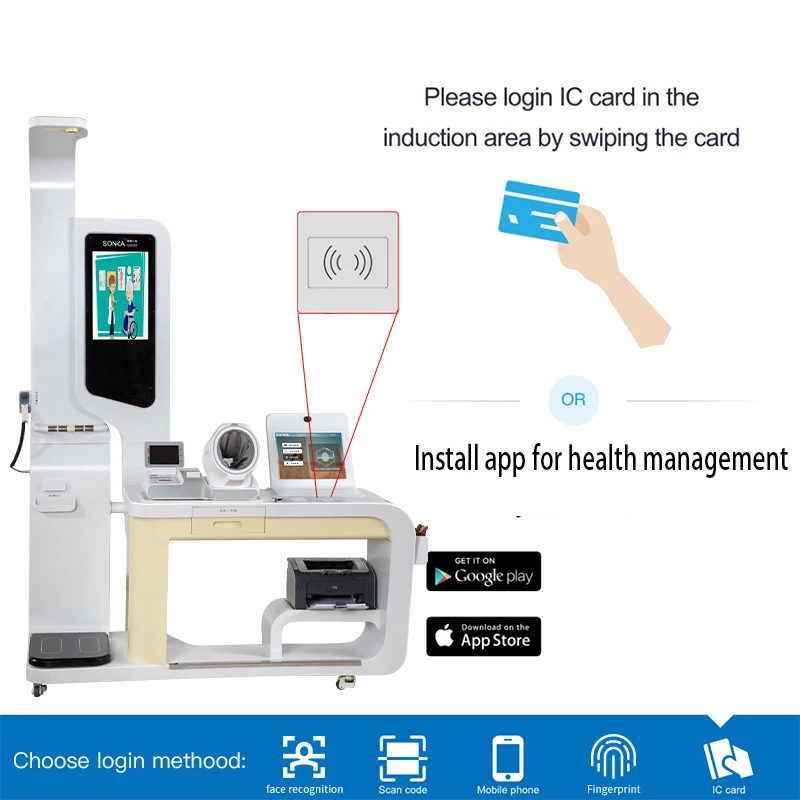
Hospitale wat begin het om gesondheidskioske te gebruik, sien werklike voordele vir hul noodafdelings en algehele kliniese werk. Volgens verskeie bedryfsverslae verminder hierdie kioske die tyd wat dit neem om inloopbesoekers te triageer met tussen 25% en 40%. Hulle hanteer dinge soos die inskrywing van persone wanneer hulle aankom en die outomatiese opneming van basiese lewenslange vitale tekens. Die stelsel help dan om uit te sorteer wie eerste aandag benodig, gebaseer op standaarde soos die Emergency Severity Index of ESI, afgekort. Dit beteken dat dokters en verpleegsters meer tyd kan spandeer aan ernstige gevalle eerder as om vas te steek met papierwerk. Verpleegsters merk veral 'n verskil op. Baie fasiliteite meld dat hul personeel ongeveer 15 minder ure per week aan administratiewe werk bestee sedert pasiënte nou self baie van hierdie take by die kiosk hanteer. Gevolglik is wagkamers nie meer so vol tydens besige periodes nie, en mediese spanne kan beskikbare hulpbronne beter aanpas aan die werklike siektewaan van verskillende pasiënte.
Om werklike verbeteringe uit hierdie kioske te kry, hang dit regtig af van hoe goed hulle met EMR-stelsels gekoppel word. Wanneer die data wat by kioske versamel word, soos pasiëntdemografika, versekeringsinligting en simptome, direk na elektroniese rekords gestuur word, spandeer mense ongeveer 40% minder tyd by intekening. Die stelsel elimineer basies al daardie dubbele invoerwerk, wat tyd bespaar en foutmaak deur personeel met ongeveer 32% verminder, volgens die Healthcare IT Journal verlede jaar. Dokters het dan onmiddellike toegang tot wat hulle nodig het sonder om op papiervorms te wag. Wat interessant is, is hoe hierdie stelsels werklik ook iets terug kan stuur. EMR's kan afspraakherinneringe stuur of navrae aan pasiënte voor besoeke deur die kioske self. Dit skep 'n volledige siklus waarin dinge vinniger stroomaf beweeg. Ons het gesien dat hospitale herhaalde toetse met byna 30% verminder en pasiënte vinniger na afsprake kan vertrek. Net om fyn kioske te hê, is egter nie genoeg nie. As hulle nie met die hoofrekordstelsel kommunikeer nie, eindig hulle as klein eilandjies van inligting wat meer probleme as oplossings vir hospitaalwerksvloeie veroorsaak.
Om regtig vir almal te werk, moet gesondheidskioske die gaping oorbrug wanneer dit by digitale vaardighede kom. Hulle moet koppelvlakke hê wat maklik is om uit te figure, dalk met prente en stap-vir-stap gidses wat mense deur die proses lei. Taal is nog 'n groot struikelblok. Kioske wat verskeie tale op skerm aanbied of selfs oudio-instruksies het, help om nie-moedertaalsprekers van agter te laat. Wanneer dit by fisiese toegang kom, maak die volg van ADA-standaarde 'n groot verskil. Dit beteken dat toestelle op hoogtes ingestel word wat vir rolstoele geskik is, knoppies wat gevoel eerder as slegs gesien kan word, en skerms wat soos nodig op en af beweeg vir mense met verskillende vermoëns. Toetsing is ook nie net iets wat van 'n lys afgevink moet word nie. Deur terugvoering van werklike pasiënte uit verskillende agtergronde te kry, kan probleme vroegtydig opgespoor word voordat hulle groot kwessies word. Sekere klinieke het beter resultate gerapporteer nadat hierdie veranderinge aangebring is, met ongeveer 40 persent meer pasiënte wat werklik hul kioske begin gebruik het. Uiteindelik behoort goeie ontwerp niemand agter te laat nie. Eenvoudige kieslyste en stembevele laat mense met gesondheidstegnologie interaksie hê, ongeag hul situasie, en hierdie benadering vertraag die proses ook nie.
Kopiereg © 2025 deur Shenzhen Sonka Medical Technology Co., Limited - Privatbeleid